Succuline Single Line: A Versatile Font for Creative Projects
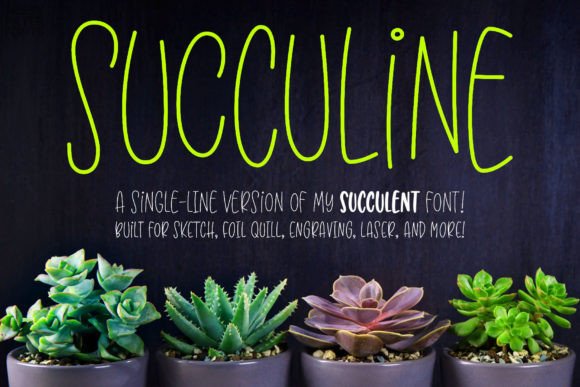
Succuline Single Line is a unique font designed for artists, designers, and crafters who want to add a playful and dynamic touch to their work. This single-line version of the Succulent font retains all the fun and bouncy double-uppercase letters that make the original so appealing. Whether you're working with a Glowforge, Cricut, Silhouette, or other laser engraving systems, this font is built to fit seamlessly into your creative workflow.
One of the standout features of Succuline Single Line is its compatibility with a wide range of tools and mediums. From sketch pens and foil quills to embossing and infusible ink, this font is versatile enough to meet the needs of various projects. Its design ensures that each letter is created with a single line, making it ideal for tools that draw with a continuous stroke rather than an outline.
Understanding Single-Line Fonts
Single-line fonts like Succuline Single Line are not your typical TTF files. They are specifically designed for use with tools that require a continuous line, such as engraving machines, sketch pens, and foil quills. Unlike standard fonts, which are meant for word processing or printing, single-line fonts are optimized for applications where a stroke-based approach is necessary.
This means that these fonts cannot be used for traditional printing or cutting. Instead, they are intended for use with styluses or nibs that create letters by drawing a single line. If you're unsure about which format you need, it's recommended to download and install both the single-line and hairline versions to see which one works best for your specific project.
OpenType and PUA Encoding for Flexibility
Succuline Single Line is not only visually appealing but also technically advanced. All characters in this font are OpenType coded and PUA-encoded, making them easily accessible in a variety of software programs. This encoding allows for greater flexibility when working with different design tools, ensuring that you can access every character without any issues.
Whether you're using Adobe Illustrator, CorelDRAW, Affinity Designer, or Inkscape, you'll find that Succuline Single Line integrates smoothly into your workflow. The key is to apply a stroke rather than a fill when working with the font. This allows you to adjust the weight of the text as needed, giving you more control over the final look of your design.
Using Succuline Single Line in Vector Programs
Vector programs like Adobe Illustrator and Inkscape offer powerful tools for creating detailed designs, and Succuline Single Line is well-suited for these environments. By applying a stroke to the text, you can customize the thickness of each letter, allowing for greater creativity and precision in your work.
Once you've adjusted the stroke width to your liking, you can expand the text to outlines, turning the font into a vector shape. This process makes it easier to manipulate individual parts of the text, giving you more freedom to experiment with different styles and effects.
Applications Across Different Industries
The versatility of Succuline Single Line makes it a valuable asset in a variety of industries. From custom jewelry and personalized gifts to signage and branding materials, this font can be used in countless ways. Its single-line design ensures that it looks great on a wide range of surfaces and materials, making it a popular choice among professionals and hobbyists alike.
For example, if you're creating custom phone cases or mugs using infusible ink, Succuline Single Line can help you achieve a clean and stylish design. Similarly, if you're working on a project that involves embossing or foil stamping, this font can add a unique and eye-catching element to your work.
Choosing the Right Format for Your Needs
When working with single-line fonts, it's important to understand the different formats available and how they might affect your results. The single-line version of Succuline is ideal for tools that require a continuous stroke, while the hairline version offers a thinner, more delicate look.
Depending on the software you're using, you may need to choose between different file formats. Some programs may require a specific format to ensure compatibility, so it's always a good idea to check the requirements before downloading or installing the font. If you're unsure, downloading both versions can help you determine which one works best for your project.
Best Practices for Working with Single-Line Fonts
To get the most out of Succuline Single Line, it's essential to follow some best practices when using it in your projects. First, make sure that your design software supports single-line fonts and that you're using the correct settings. Applying a stroke instead of a fill is crucial, as this allows you to adjust the weight of the text and maintain the integrity of the single-line design.
Additionally, consider the material you're working with when choosing the stroke width. Thicker strokes may be more visible on certain surfaces, while thinner strokes can create a more subtle effect. Experimenting with different settings can help you achieve the desired look for your project.
Exploring Creative Possibilities
Succuline Single Line opens up a world of creative possibilities for artists and designers. Whether you're looking to add a unique touch to a custom gift or create a bold statement for a brand, this font can help you achieve your vision. Its playful and bouncy style adds a sense of energy and movement to any design, making it a popular choice for those who want to stand out from the crowd.
By incorporating Succuline Single Line into your workflow, you can enhance your projects with a fresh and dynamic look. Its compatibility with a wide range of tools and software makes it a valuable addition to any creative arsenal, offering both flexibility and functionality in equal measure.